
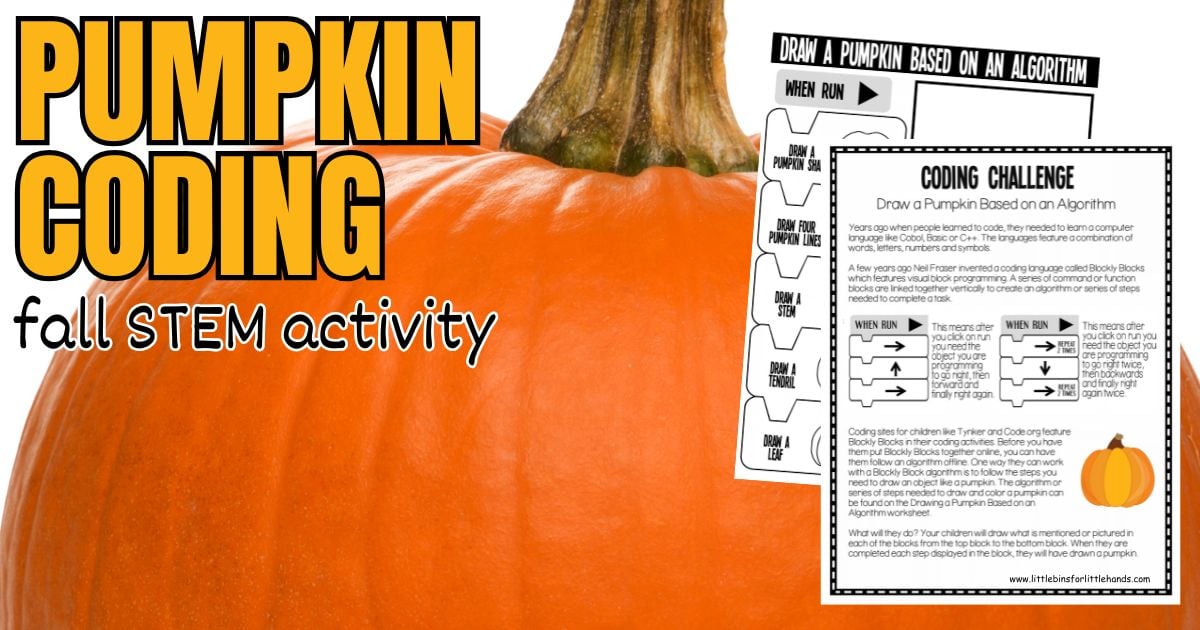
Add a little coding to your pumpkin theme with this simple screen-free pumpkin coding activity! Kids will follow a visual algorithm step by step to draw a pumpkin while practicing sequencing, logical thinking, and computational thinking.
This is an easy way to bring the technology side of STEM into a fall lesson without needing computers, apps, or special supplies.
Field: Computer Science / Technology
Grades: 1–5
Concepts: Algorithms, Sequencing, Computational Thinking, Unplugged Coding
Get the Free Pumpkin Coding Printable
Start with the free Draw a Pumpkin With an Algorithm printable!
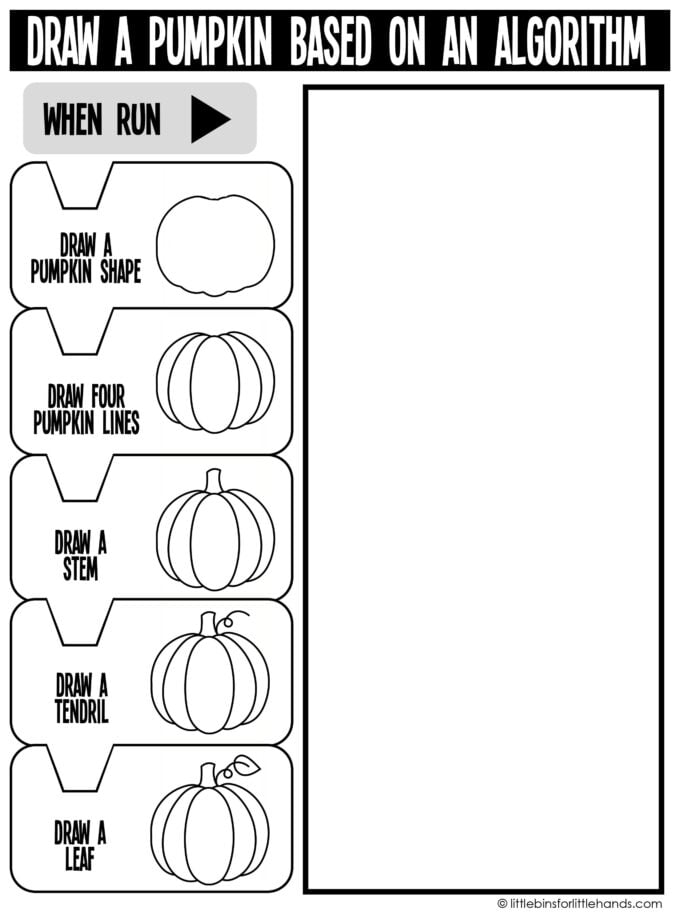
Kids follow the visual coding blocks from top to bottom to build their pumpkin one step at a time. The sequence has them draw the pumpkin shape, add the pumpkin lines, draw a stem, add a tendril, and finish with a leaf. Fall_Draw_a_Pumpkin_Algorithm
👉 CLICK HERE TO GET THE FREE PUMPKIN CODING ACTIVITY
Use it for:
- Fall STEM centers
- Pumpkin theme activities
- Computer science lessons
- Early finishers
- Screen-free coding practice
- Homeschool STEM
- Morning work
Once kids understand the activity, encourage them to create their own drawing algorithm too!
What Is an Algorithm?
An algorithm is a set of steps used to complete a task.
We use algorithms all the time, even when we are not working with computers. Following a recipe, giving directions, building something from instructions, and completing a morning routine all involve steps completed in a particular order.
🔎 In computer programming, an algorithm tells the computer what actions to perform and in what sequence. This pumpkin activity introduces the same idea in a very simple, visual way.
The printable uses block-style instructions similar to the visual block programming kids may encounter in beginner coding programs. The original activity was designed to help kids practice following an algorithm offline before working with block coding on a screen.
👉 Explore more simple beginner coding activities for kids
Supplies
- Free Draw a Pumpkin Algorithm printable
- Pencil
- Crayons, colored pencils, or markers
That’s it!
How to Draw a Pumpkin With an Algorithm
1. Start With the First Block
Begin at the top of the algorithm.
Draw the basic pumpkin shape shown in the first block.
2. Follow the Instructions in Order
Move down to the next block and complete that instruction before continuing.
Kids will gradually add:
- Four pumpkin lines
- A stem
- A tendril
- A leaf
3. Complete the Pumpkin
Continue from the top of the algorithm to the bottom until you complete every block. Kids should now have a finished pumpkin!
4. Add Color
Color the pumpkin or add a background, vines, leaves, or other fall details.
Why Does the Order Matter?
This is where you can turn a quick printable into a useful coding discussion. Ask kids what might happen if they completed the instructions in a completely different order.
- Would it still be possible to create the pumpkin?
- Would some instructions be harder to follow?
- Could you draw the stem before drawing the pumpkin?
💡 The activity helps demonstrate that sequence matters when following an algorithm.
A computer follows instructions exactly as they are given. If the instructions are incomplete, unclear, or placed in the wrong order, the result may not be what the programmer intended.
Try a Pumpkin Coding Challenge
Once kids finish the printable, challenge them to create their own algorithm.
Choose another simple fall object, such as:
- Apple
- Leaf
- Acorn
- Owl
- Scarecrow
- flower
🎃 First, draw the object. Then break the drawing into a series of smaller steps. Write or draw one instruction for each step. Finally, give the algorithm to someone else.
Can they follow your instructions and create the same picture?
💡 This also makes a great introduction to debugging. If the final drawing doesn’t look right, kids can go back through the directions and decide what to change.
What Kids Learn
A simple unplugged coding activity can introduce several important computer science skills.
- Sequencing: Kids complete instructions in a particular order.
- Algorithms: Kids see how a larger task can be broken into smaller steps.
- Computational Thinking: Kids think about how to organize and communicate a process.
- Problem-Solving: Kids can identify where instructions may need to change or be clarified.
- Debugging: Kids can test an algorithm and improve it when something doesn’t work as expected.
More Screen-Free Coding Activities
You don’t need a computer to begin exploring coding concepts.
Our Coding Activities for Kids collection includes more screen-free ways to explore algorithms, binary code, secret coding pictures, and computational thinking.
You can also try our Fall Secret Coding Pictures, where kids follow directional commands on a grid to reveal hidden fall animals. Your existing fall coding printables currently include squirrel, owl, and fox mystery pictures.

Add Coding to Pumpkin STEM
Coding gives you an easy way to include the T in STEM during a pumpkin theme.
Pair this printable with a few hands-on pumpkin activities:
- Pumpkin Science Experiments for life science, chemistry, measurement, and physical science.
- Parts of a Pumpkin for a simple pumpkin anatomy investigation.
- Pumpkin Math Activities for counting, measuring, weighing, and graphing
- Fall STEM Activities for more seasonal engineering, science, math, and technology ideas.
Guiding Questions
Use these questions before, during, or after the activity:
- What is an algorithm?
- Why do you think the instructions are placed in this order?
- What might happen if you skipped a step?
- Could you change the order and still draw a pumpkin?
- How could you make the instructions clearer?
- Could two different algorithms produce similar pumpkins?
- What other object could you draw with an algorithm?
FAQ
Is this a real coding activity?
Yes. Kids are working with algorithms and sequencing, which are foundational computer science concepts. Unplugged coding lets kids practice these ideas without using a computer.
What grades is this pumpkin coding activity best for?
It works especially well for grades 1–5. Younger students may need help reading or interpreting the blocks, while older students can extend the activity by writing their own algorithms.
Do kids need coding experience?
No. This activity is designed for beginners.
Do I need a computer or tablet?
No. This is a completely screen-free coding activity.
Can I use it in a STEM center?
Yes! Print the worksheet and add pencils or markers for an easy, low-prep fall STEM or technology center.
What can kids try next?
Explore more Coding Activities for Kids, including algorithms, binary code, and secret coding activities.
Printable Pumpkin STEM Pack
Want your pumpkin science, STEM, math, and art activities organized?
Our Pumpkin STEM Pack includes 100+ pages of pumpkin-themed science, engineering, early math, and hands-on activities. It’s a great way to build a complete pumpkin theme without needing a Halloween focus.
👉 Explore the Printable Pumpkin STEM Pack
More to Explore
Pumpkin Science Experiments |Pumpkin STEM Activities | Parts of a Pumpkin | Coding Activities for Kids | Fall STEM Activities